Pages

Search

Tuesday, August 28, 2012

Pinterest for BlackBerry Playbook and BlackBerry 10

Hello All,

     Today i am very happy because very long time you and me waiting about Pinterest App for BlackBerry Playbook and BlackBerry 10.And now today those time end and i provide you installer file of Pinterest for BlackBerry Playbook and BlackBerry 10.

Download .bar File

Friday, July 20, 2012

Producer-Consumer Problem using TPL and Blocking Collection

.NET 4.0 frameworks, has introduced TPL (Task Parallel Library) that has several advantages in achieving concurrency. Also there are thread safe collections like “ConcurrentQueue”, “BlockingCollection”, “ConcurrentDictionary”, “ConcurrentBag”, etc….

Producer would broadcast the data maybe which should be thread safe, in case if there are multiple producers who post the data.
Consumer reads the data published may be via queue.
At a point of time consumers should know or signaled saying the posting of data is completed by the producers or source.
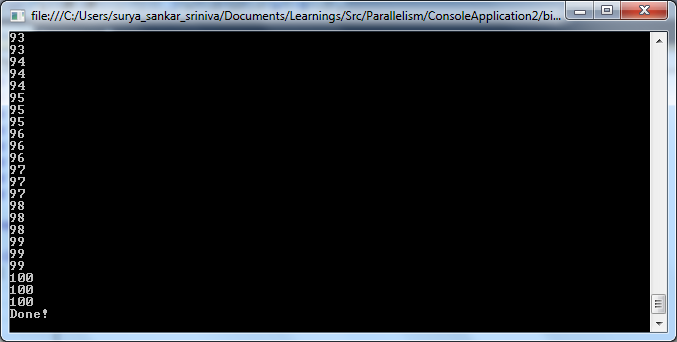
Below example is considering there are 3 producers (3 tasks) adding numbers from 1 to 100 to queue in parallel.
At the same time, there are 2 consumers (2 tasks) reading numbers from the queue.
So adding and reading happens parallel using 5 tasks (3 for adding, 2 for reading). However when adding is completed, reading tasks should be signaled and that helps consumers to quit from reading data.
For this we use “BlockingCollection”, which is a new thread safe collection class in .NET 4.0.
Enumerator from BlockingCollection, has a feature to pop the item from the collection. Which mean, when we iterate using enumerator of blocking collection, it not only reads the item but also removes the item which is read from the collection. Also it tries to pop the items until it is signaled (calling “CompleteAdding” method).
    class Program
    {
        static void Main(string[] args)
        {
            try
            {
  var queue = newBlockingCollection<int>();
                var producers = Enumerable.Range(1, 3)
                    .Select(_ => Task.Factory.StartNew(
                        () =>
                        {
                            Enumerable.Range(1, 100)
                                .ToList()
                                .ForEach((i) =>
                            {
                                queue.Add(i);
                                Thread.Sleep(100);
                            });
                        }
                        ))
                        .ToArray();

                var consumers = Enumerable.Range(1, 2)
                    .Select(_ => Task.Factory.StartNew(
                        () =>
                        {
                            foreach (var item in queue.GetConsumingEnumerable())
                            {
                                Console.WriteLine(item);
                            }
                        }
                        ))
                      .ToArray();
                Task.WaitAll(producers);
                queue.CompleteAdding();
                Task.WaitAll(consumers);
 Console.WriteLine("Done!");
            }
            catch (Exceptionexp)
            {
                Console.WriteLine("Error : " + exp.Message);
            }
            Console.Read();


Monday, June 18, 2012

Using Tasks in APM


The “FromAsync” method in the Task Framework helps to build Task object from the “Async” methods (APM). Below code is an example of the same.

Also beside, using  “FromAsync” method, “TaskCompletionSource” object helps to set the result in the callback method.
Below code has both as examples.
namespace ConsoleApplication5
{
    class Program
    {
        delegate int delSum(int a, int b);
        static void Main(string[] args)
        {
            try
            {
                delSum oSum = new delSum((a1, a2) =>
                {
                    Thread.Sleep(2000);
                    return a1 + a2;
                });

                //Using "From Async" method to convert APM to TAP
                Task<int> aa = Task<int>.Factory.FromAsync(
                    oSum.BeginInvoke, oSum.EndInvoke, 4, 5, null);
                aa.ContinueWith(t => Console.WriteLine("using from async method " + t.Result));

                //Using "Task Completion Source", to set the task result from IAsyncResult
                TaskCompletionSource<int> source = new TaskCompletionSource<int>();
                oSum.BeginInvoke(8, 9, ar =>
                     {
                         try
                         {
                             source.SetResult(oSum.EndInvoke(ar));
                         }
                         catch (Exceptionexp)
                         {
                             Console.WriteLine("Error : " + exp.Message);
                         }
                     }, null);

                source.Task.ContinueWith(t => Console.WriteLine("using task completion source " + t.Result));
            }
            catch (Exceptionexp)
            {
                Console.WriteLine("Error : " + exp.Message);
            }
            Console.Read();
        }

    }
}


Tuesday, May 15, 2012

Photo Effect App

Hello,

      Now you do more attractive and awesome effect to Photo in BlackBerry Smart Phone  by using  "Photo Effect App".You can download from below link.

      Download.

Monday, April 9, 2012

Optional and Named Parameters – C#


Visual studio 2010 C#, has extended the capability of calling a function with its argument based on name and also can omit the optional parameters which are set with default value in the function declaration.
Below example demonstrates the same.
Program.cs
  class Program
    {
        static void Main(string[] args)
        {
            try
            {
                //calling the function normally
                Console.WriteLine(CaculateArea(10, 20, "Rectangle 1"));

                //calling the function providing only "length" as named parameter and others will be default
                //which are optional
                Console.WriteLine(CaculateArea(length: 100));

                //calling the function sending all the arguments as named parameters whose order need
                //not be same as arguments order in the calling function.
                Console.WriteLine(CaculateArea(name: "Rectangle 2", width: 100, length: 200));
            }
            catch (Exception exp)
            {
                Console.WriteLine("Error : " + exp.Message);
            }
            Console.Read();
        }

        //function which width and name with default values which are like optional parameters.
        //optional parameters should always be declared at the end after the actual parametes.
        static string CaculateArea(int length, int width = default(int), string name = "No Name")
        {
            return string.Format("The area of \"{0}\" is {1}", name, length * width);
        }
    }

Output:


Partial Class and Method


Declaring a class as “partial” enables the developer to extend the capabilities of class to add extra members with in by creating the same partial class in an another file.

Ex:-
I can create below class in “Class1.cs”
  public partial class Class1
    {
        public void Method1()
        {
            Console.WriteLine("Hello this is method1");
        }
    }
I can also create a class with same name (Class1) as below, in “Class2.cs”, which means I am trying to add functions to an existing partial class.
  public partial class Class1
    {
        public void Method2()
        {
            Console.WriteLine("Hello this is method2");
        }
    }
Similarly, partial methods can be declared in a partial class and can be implemented in the specific partial class. Below example demonstrates the same.

Program.cs
    public partial class MyClass1
    {
        public void Met1()
        {
            Console.WriteLine("Method 1");
            Met2();
        }
         partial void Met2();
    }

MyClass.cs

  public partial class MyClass1
    {
        partial void Met2()
        {
            Console.WriteLine("Method 2");
        }
    }

Now when I create instance for “MyClass1” and invoke “Met1”, “Met1” when calls “Met2” it calls the implemented function in specific partial class.
Note: Partial methods cannot be declared with access specifiers and also cannot be invoked from the object of the class directly which in turn can be called in an another function(s).